
WyzeShelf
A temporary shelf for drag and drop. Shake your pointer, drop files, text and links, then drag them all out in one gesture.
FREE No account, no subscription. This app is completely free.
Updated November 2026
Your download starts right away. Mac with Apple silicon · 115 MB
Demo & screenshots
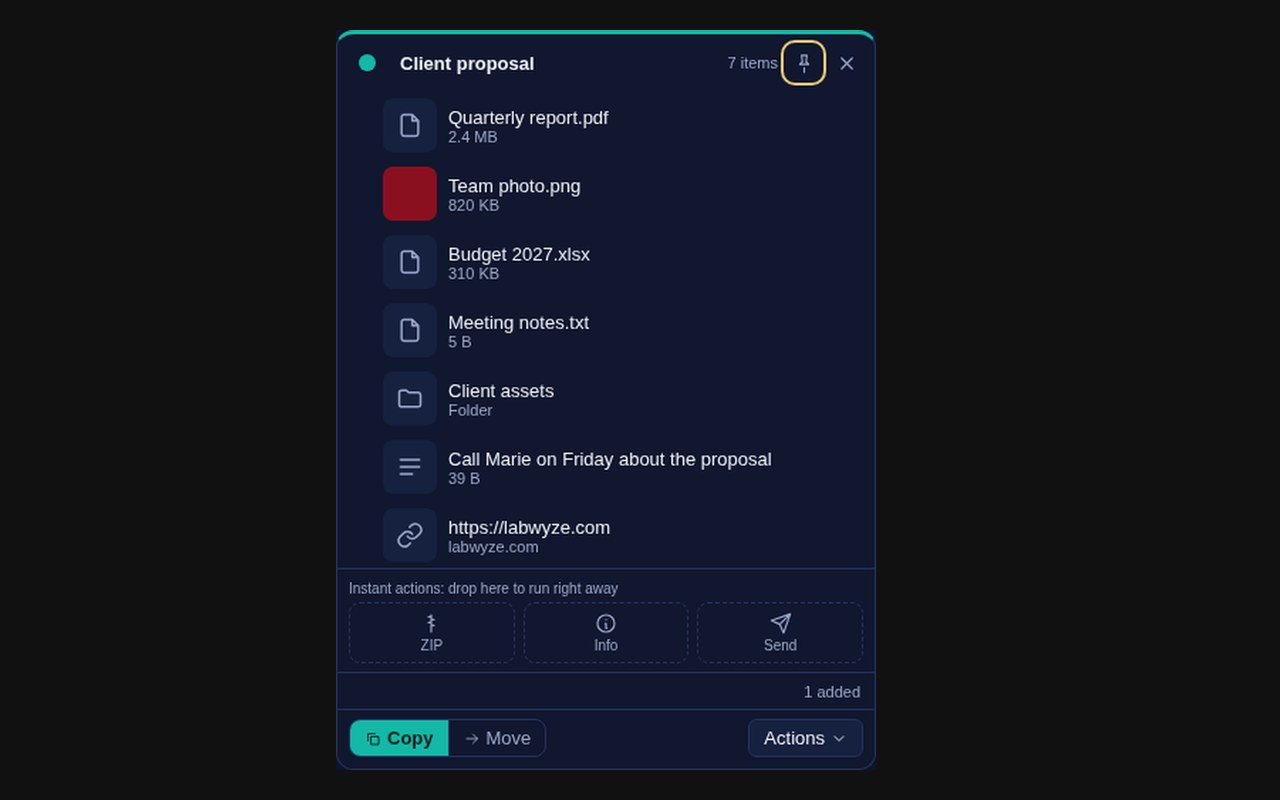
WyzeShelf is a small floating shelf for the things you are about to move. Shake your pointer, or press ⌃⌥S, and a shelf opens next to your work. Drop files, folders, snippets of text and links on it, then drag them into any app, all at once.
It is built for the moments when the source and the destination are not on screen together. Park items on the shelf, switch apps, and drop them where they belong. Everything stays on your Mac: there is no account and nothing is uploaded.
What you get
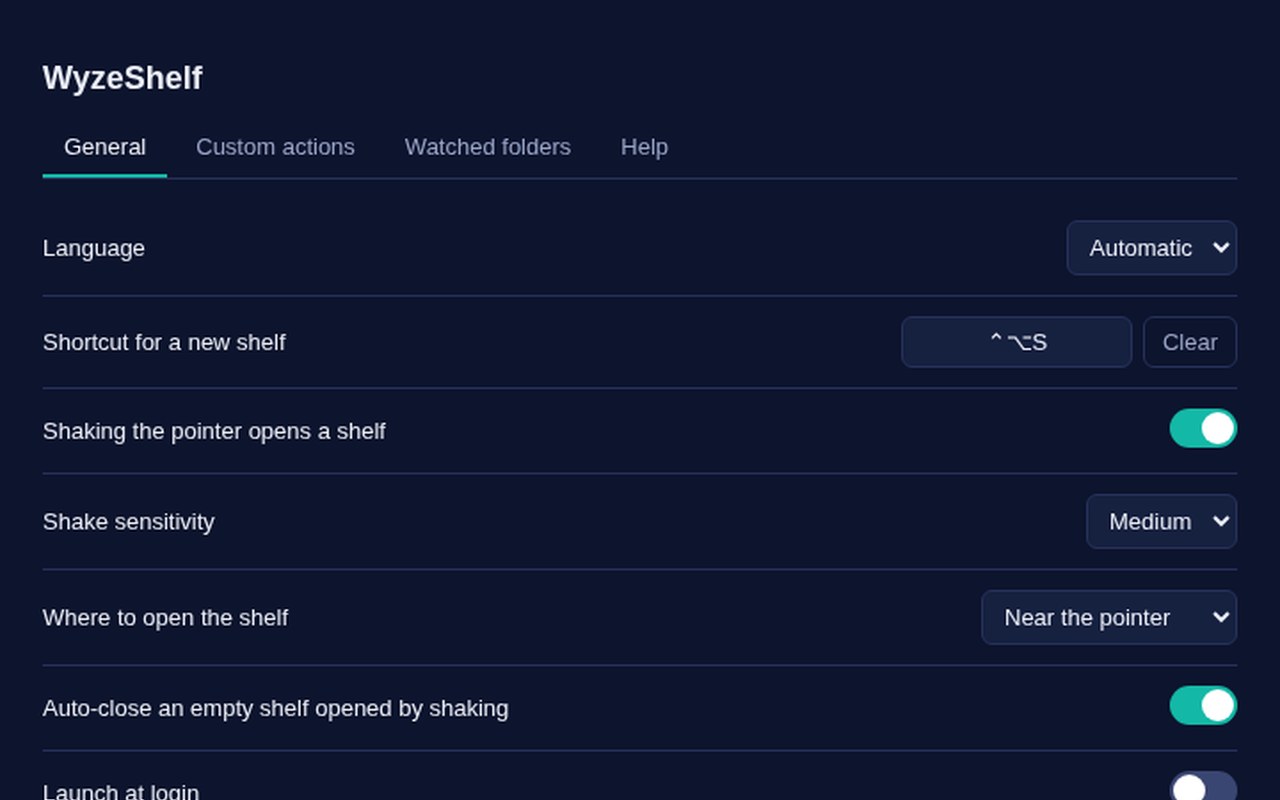
- Shake to open — Shaking the pointer opens a shelf. The sensitivity can be set to low, medium or high, and a shelf opened this way closes by itself if it stays empty.
- A shortcut for a new shelf — ⌃⌥S opens a new shelf by default. You can record another combination in the settings.
- Files, folders, text and links — Drop files and folders, selected text, or a link. Text and links become items you can drag out again. Dropping the same file twice is ignored.
- Drop from several places — Drop onto the shelf, onto the menu bar icon or the Dock icon, or paste with ⌘V.
- Copy or move — Choose whether dragging to a folder copies or moves. Move mode watches for an identical copy in your folders, then puts the original in the Trash.
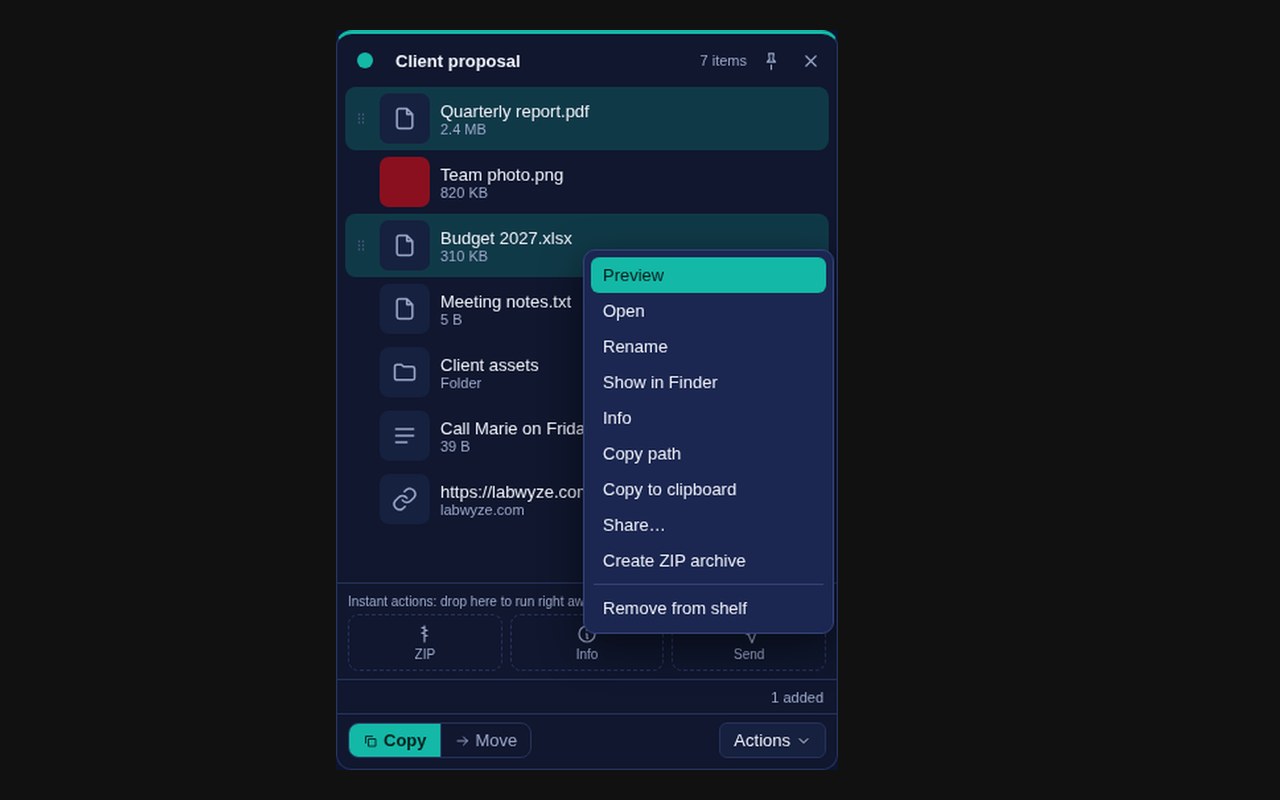
- Preview, rename, reveal — Right-click an item to preview it, open it, rename it, show it in the Finder, copy its path or copy it to the clipboard.
- Share and ZIP — Send the items through the macOS share menu, or build a ZIP archive of what is on the shelf.
- Undo — The last removals from a shelf can be undone, up to 10 steps.
- Your own actions — Create actions that run a shell command on the items, for example an image conversion. Up to 10 actions, and a command is stopped after 60 seconds.
- Watched folders — Pick up to 10 folders. When a new file arrives in one, a shelf opens with that file on it.
- Automation link — A wyzeshelf://add?path=… link adds a file to a shelf, which helps with scripts, Shortcuts or Alfred.
- English and French — The interface follows your system language.
Perfect for
- Moving files between windows or Spaces without a cluttered desktop
- Collecting attachments, screenshots and notes before writing an email
- Gathering items from several folders to send or zip in one go
- People who run small repetitive actions on files with a shell command
Frequently asked questions
What is WyzeShelf?
WyzeShelf is a temporary shelf for drag and drop on macOS. You drop files, text and links on it, then drag them out to another app in one gesture. It is free for a limited time.
How do I open a shelf?
Shake the pointer, press ⌃⌥S, or use the menu bar icon. The shake can be turned off or made less sensitive in the settings.
Does WyzeShelf upload my files?
No. The code contains no network call for your items, and there is no account. Items stay on your Mac.
Does a shelf copy my files?
A shelf keeps a reference to each file, not a copy. If you move or delete the original, the item on the shelf can no longer be opened.
What does Move mode do to my files?
macOS treats every drag out of an app as a copy. In Move mode, WyzeShelf waits for an identical copy of the file to appear in one of your folders, then puts the original in the Trash. It skips files larger than about 4 GB. Use Copy mode if you prefer to keep the original.
Can I sync shelves with iCloud, Google Drive or Dropbox?
There is no built-in cloud. You can drag items into the iCloud Drive, Google Drive, OneDrive or Dropbox folders on your Mac. There is no OCR, no widget, and no Alfred, Raycast or Siri extension.
The shake opens a shelf when I do not want it. What can I do?
Lower the shake sensitivity or turn the shake off in the settings. Shelves opened by a shake and left empty close by themselves.
Which Macs does it run on?
Macs with Apple silicon (M1 and later). The app is not available for Intel Macs.
Is there anything I could not test?
The interface and the core logic are covered by automated tests. The parts that depend on macOS itself, meaning the real shake, dragging out to other apps, Quick Look, the share menu and the Dock, could not be tested on a Mac before publication. If something misbehaves, please tell us.
macOS says the app cannot be opened. What do I do?
The app is signed with our Apple Developer ID and notarised by Apple, so it opens normally after you drag it to Applications. If macOS still shows a warning, make sure you downloaded the latest version from this page, then open System Settings > Privacy & Security and click Open Anyway.
More from Labwyze Apps
WyzePDFFree
The PDF editor for Mac that does it all: annotate, fix text, fill, sign and protect. Fully offline.

WyzeChessFree
Cinematic 3D chess: sculpted armies march, fight and fall on every capture. Play the computer or a friend.
WyzeTasksFree
Kanban boards for your Mac that work offline. Plan, drag, finish. No account, no cloud.
FrameDeckFree
Manage the art on all your Samsung The Frame TVs from your Mac. Upload, browse free museum art and rotate in a few clicks.

WyzePlanFree
Plan projects the way they really work: say what waits for what, and every date calculates itself.

WyzeSnapFree
Capture any part of your screen, mark it up and share it in seconds. Everything stays on your Mac.

WyzeScribeFree
Record your calls and meetings, both sides, and get an editable transcript made on your own Mac. No bot, no upload.

WyzeSketchFree
A hand-drawn whiteboard for diagrams and ideas. Sketch, save as a file, export to PNG, SVG or PDF. All on your Mac.

WyzeMotionFree
Record your screen and let the zooms write themselves. The camera follows your cursor, so your tutorials and demos look polished with no editing.

WyzePhotoFree
Edit photos with layers, masks and adjustments you can change at any time. Opens PSD and camera RAW files. Everything stays on your Mac.
WyzeBlocFree
A calm falling-blocks game for one player. Slow pace, soft colours and music. Breathe, place, enjoy.

WyzeClearFree
Remove the background from any photo in seconds. The AI runs on your Mac, so your pictures are never uploaded.
WyzeSolidFree
Open, measure and edit 3D CAD files on your Mac. STEP, IGES, BREP and STL, with nothing sent online.

WyzeFocusFree
A task manager designed for ADHD minds. Plan your day, pick what fits, and get unstuck, with no streaks and no points. Synced through your iCloud, on Mac and on iPhone and iPad in Safari.

WyzeMindFree
A studio for your mind. Every idea becomes an object, and everything connects, with backlinks, a graph, iCloud sync and an optional AI assistant that can also read your images. On Mac, and on iPhone and iPad in Safari.