
WyzeMind
A studio for your mind. Every idea becomes an object, and everything connects, with backlinks, a graph, iCloud sync and an optional AI assistant that can also read your images. On Mac, and on iPhone and iPad in Safari.
FREE No account, no subscription. This app is completely free.
Updated November 2026
Web version: free, nothing to install, on iPhone, iPad and any computer. Native iPhone and iPad apps coming soon.
Your download starts right away. Mac with Apple silicon · 116 MB
Demo & screenshots
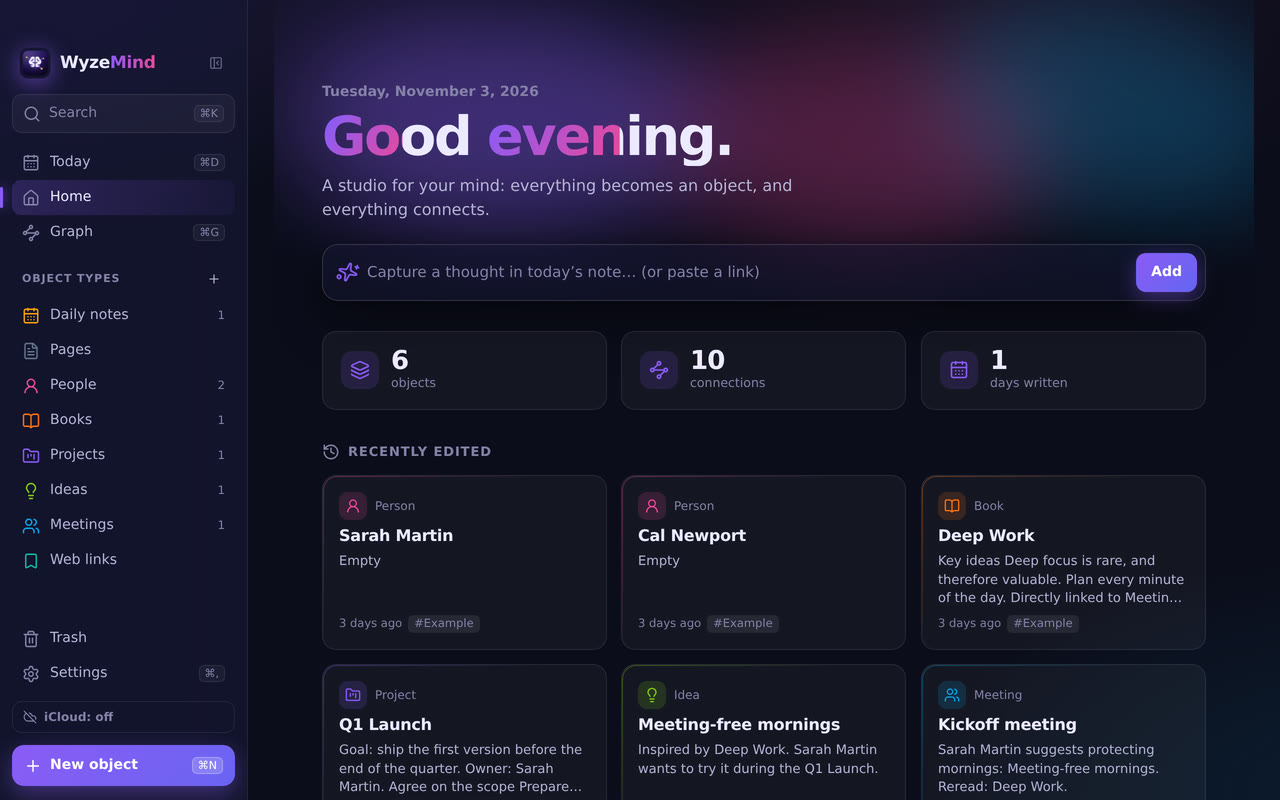
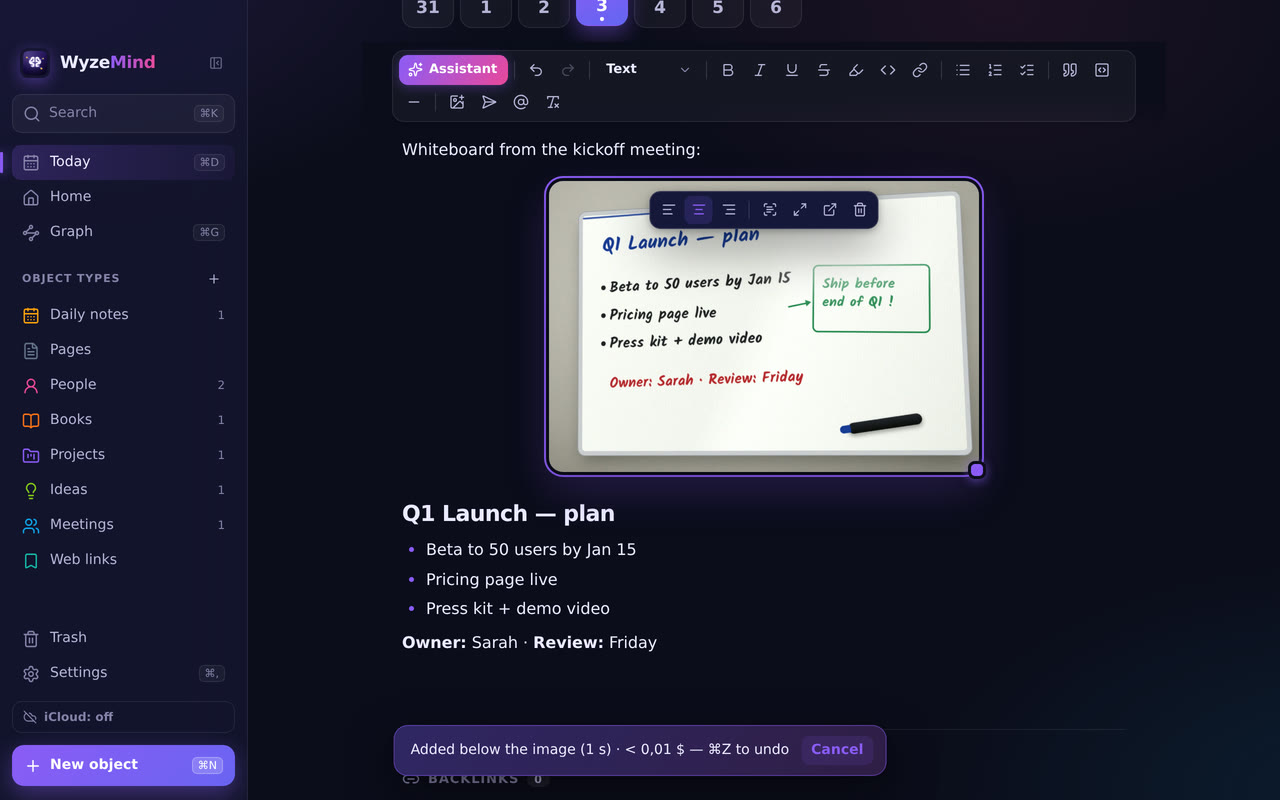
WyzeMind is a place to think. Each idea becomes an object: a Person, a Book, a Project, an Idea, a Meeting, a Web link, a Page, or a type you define. Then you link them together.
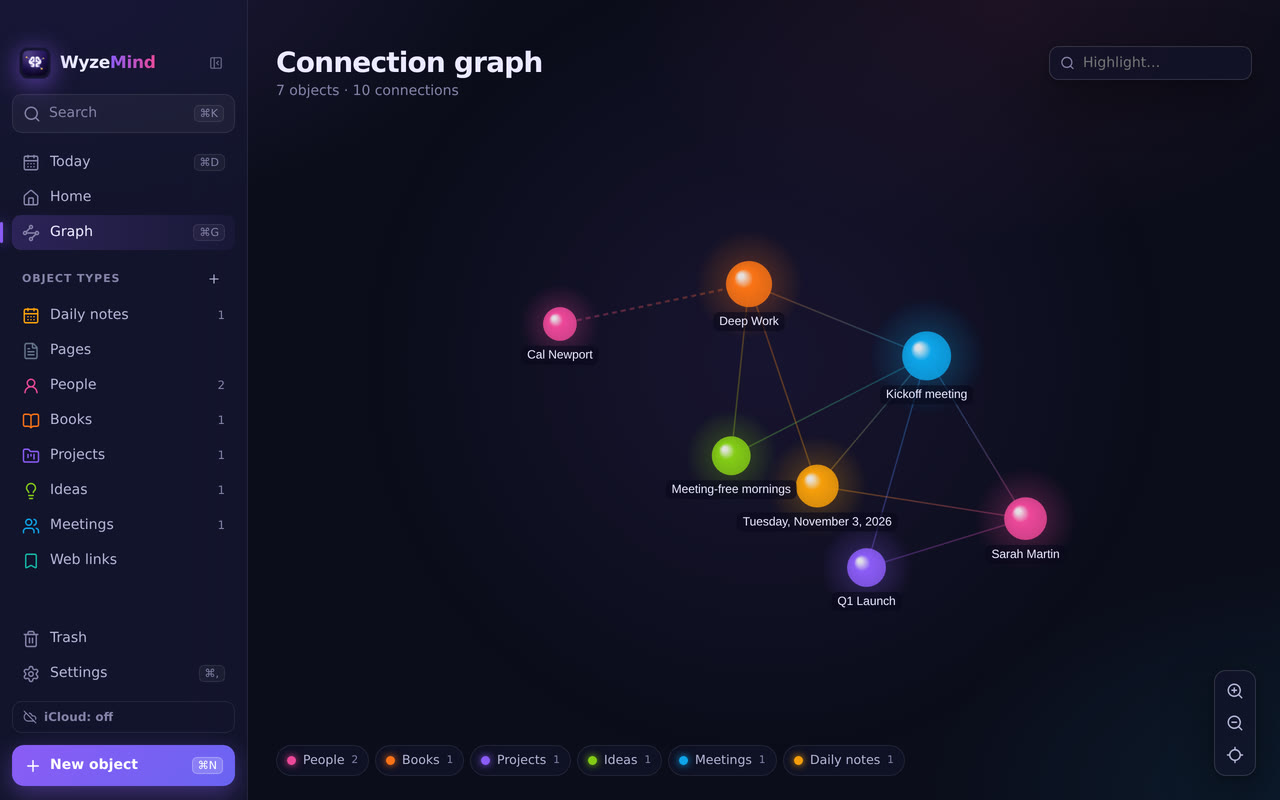
Write with `@` or `[[` to connect one object to another. Each object shows what mentions it, and a graph draws the whole web. Your notes are stored on your Mac and the app works offline. Turn on iCloud sync to find them on your other Macs and on your iPhone or iPad, in the web version at wyzemind.labwyze.com. The optional writing assistant only goes online when you click it.
What you get
- Objects with types — Person, Book, Project, Idea, Meeting, Web link, Page and daily notes are built in. You can create your own types with a name, an icon, a colour and properties.
- Daily note — ⌘D opens today’s note, the place to capture a thought. A week strip shows the days you have written.
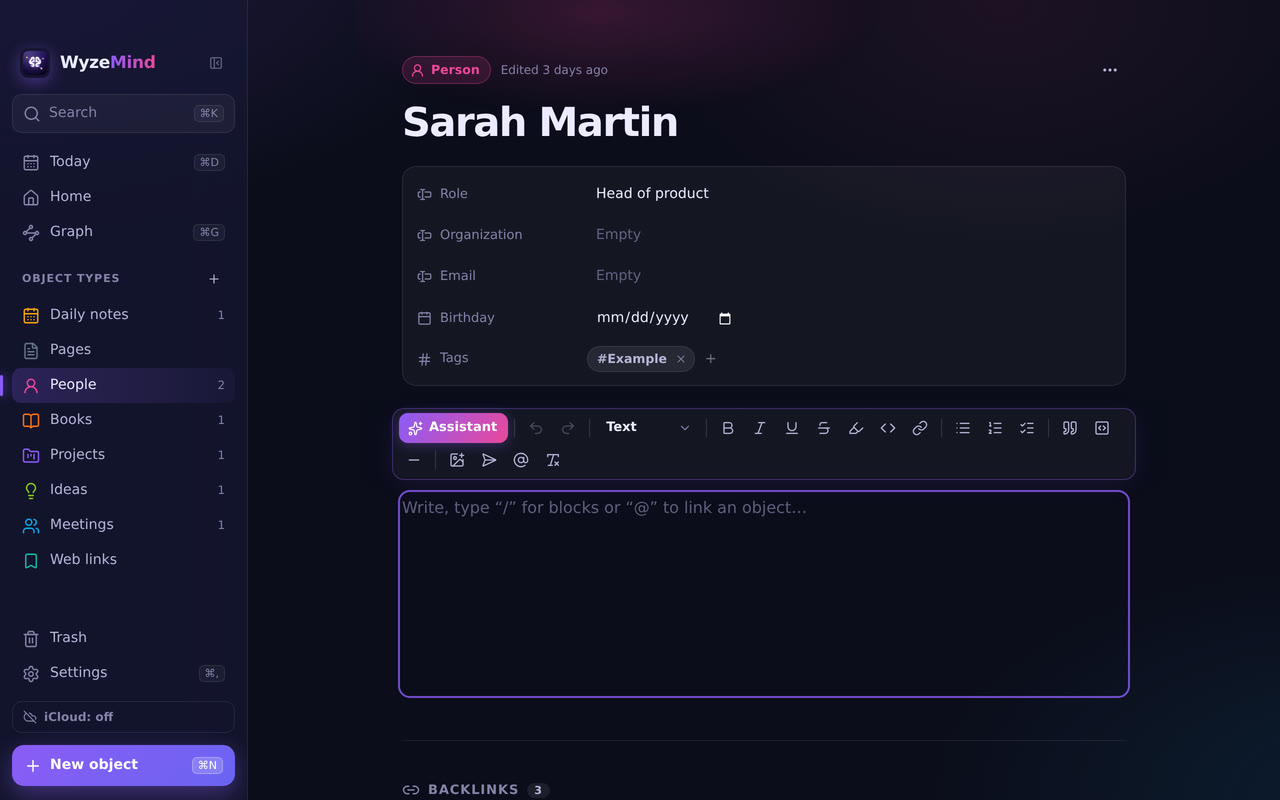
- Block editor — Headings, bulleted, numbered and to-do lists, quotes and code blocks. Type “/” for blocks, and use the formatting bar on a selection.
- iCloud sync — Sign in with Apple once, and your notes, types and images sync between your Macs and the web version, through your own iCloud. There is no WyzeMind server. A note edited on two devices at once is merged, and if the same paragraph changed on both, both versions are kept. Images over 15 MB stay on the device that has them (Apple’s limit).
- iPhone and iPad, in Safari — The web version at wyzemind.labwyze.com is the same app, adapted to touch. Open it in Safari, sign in with the same Apple account, then use Share > Add to Home Screen to open it full screen. It keeps a copy on the device and works offline. Web link titles, Markdown export and the Claude Code engine are Mac only.
- Send to WyzeFocus — Turn the selected lines, or the unchecked boxes of a note, into tasks in WyzeFocus. Each task keeps a link back to the note.
- Links with @ and [[ — Link any object from your text, or create a new one on the fly.
- Images in your notes — Paste an image with ⌘V, drag it in, or use the editing toolbar. Resize it, align it, enlarge it, or open it in Preview. Images are copied into your vault. The limit is 25 MB per image, and PNG, JPEG, GIF, WebP, BMP and AVIF are supported. iPhone HEIC photos are converted to JPEG with the macOS tool sips, a step we could not test on a Mac.
- Backlinks — Each object lists the objects that mention it, with the sentence where they do.
- Unlinked mentions — Finds places where you wrote an object’s name without linking it. Link one, or all of them, in a click.
- Typed properties — Text, number, date, choice, checkbox, web address, star rating and relations to other objects, plus tags.
- Collections — View all objects of a type as cards or as a table, with filter and sort.
- Connection graph — ⌘G draws the web of objects as a graph. Hover for details, filter by type, and click a node to open the object.
- Command palette — ⌘K searches titles and text without needing accents, runs commands and creates objects.
- Writing assistant (optional) — Click the ✨ button in the editing toolbar, or type “/” and then “polish” or “structure” in the block menu. Polish fixes spelling and unclear sentences, Structure adds headings, lists and tasks, and a free request lets you ask for something else. It works on the selection or on the whole note, replaces the text directly, and ⌘Z brings the original back. If the result loses an @ link or an image, it is rejected and nothing changes.
- Read text from images (optional) — Select an image in a note and choose Read the image. Extract text copies the text it contains, such as a whiteboard, a receipt or a screenshot, exactly as written. Describe sums up what the image shows, and you can also ask a question about it. The result is added under the image, and ⌘Z removes it. This uses the writing assistant with OpenRouter or the Anthropic API, and the image is sent to that provider when you click.
- Web link bookmarks — Paste an address and WyzeMind reads the page’s title and site. This happens without the assistant.
- Trash and Markdown export — A trash with restore, and a full export to Markdown with [[links]] and the properties as a YAML header (⇧⌘E).
- Light, dark and two languages — Light or dark theme, an accent colour, reduced motion, a readable column or full-width text, and a sidebar you can fold into a strip of icons. In English and French.
Perfect for
- Researchers, writers and students who build a web of notes over time
- People who like Notion or Obsidian-style linking but want a simple, local app
- Anyone who wants to capture a thought quickly in a daily note
- Those who want their notes in plain files they can export to Markdown
Frequently asked questions
What is WyzeMind?
WyzeMind is a note-taking app for macOS where every idea is a typed object that you link to others. It has backlinks, a connection graph, a daily note, a command palette and iCloud sync. A web version runs on iPhone and iPad. It is free for a limited time.
Where are my notes stored?
In a vault folder inside the app’s data folder on your Mac, with one JSON file per object. You can open it from the File menu with Show Vault in Finder. If you turn on sync, a copy also goes to your own iCloud private database. There is no account with us.
How do I sync between my Mac and my iPhone?
In WyzeMind on your Mac, open Settings > iCloud sync and click Sign in with Apple. Then open wyzemind.labwyze.com in Safari on your iPhone or iPad and sign in with the same Apple account. Your notes sync within a few seconds of a change, when you come back to the app, and every 5 minutes. Your assistant keys are not synced: enter them on each device.
Is anything sent over the internet?
In four cases. When you save a web link, WyzeMind fetches that page to read its title and site name. If you turn on iCloud sync, your notes go to your own iCloud private database, which we cannot read. If you use the optional writing assistant, the text or image you ask about is sent to the provider you chose (OpenRouter, Anthropic or Claude Code), only when you click. And every 6 hours the Mac app reads a small public file to see whether a newer version exists, without sending any data. Nothing else uses the network.
What happens if my Mac loses power while I write?
Files are written to a temporary file first and then renamed, so a power cut does not leave a half-written file. An unreadable file is set aside in a corrupt folder and never deleted.
Are there backups?
Yes. WyzeMind makes one automatic backup per day and keeps the last 14. It also makes a safety backup before a permanent deletion or a restore, and keeps the last 10.
Can I export my notes?
Yes. A full export to Markdown keeps the [[links]] and writes the properties as a YAML header.
How does the writing assistant work, and what does it cost?
It is optional and off until you set it up in Settings > Assistant. You choose an engine: OpenRouter, the Anthropic API, or Claude Code if it is installed and signed in on your Mac. For OpenRouter and Anthropic you bring your own API key and pay that provider for what you use; WyzeMind does not charge for it and does not include any credit. Claude Code uses your own Claude plan. Keys are encrypted by macOS and stored outside your vault, so they are never saved in a backup or an export. A Claude subscription token (sk-ant-oat…) is refused, because Anthropic does not allow it in a third-party app. Reading images works with OpenRouter and the Anthropic API, not with Claude Code.
Is my text kept by the AI provider?
WyzeMind sends the text only when you click, and asks OpenRouter to use only providers that do not keep data for training (data_collection: deny). What each provider does with your text is governed by that provider’s own policy, which we cannot check for you. If you do not want any text to leave your Mac, do not set up the assistant.
Can the assistant damage my notes?
It replaces the text directly, so check the result. ⌘Z brings the original back. If the answer drops an @ link or an image, WyzeMind rejects it and changes nothing.
Is it a replacement for Obsidian or Notion?
No. It is a smaller app, with no collaboration and no plugins. Its notes are not stored as Markdown files in the vault, but you can export them to Markdown.
Which Macs does it run on?
Macs with Apple silicon (M1 and later). The app is not available for Intel Macs, but the web version runs in a recent browser.
How do I open the app the first time?
WyzeMind is signed with a Developer ID and notarised by Apple. The first time, macOS asks you to confirm that you want to open an app downloaded from the internet: click Open. If you still see a warning, open System Settings > Privacy & Security and click Open Anyway.
More from Labwyze Apps
WyzePDFFree
The PDF editor for Mac that does it all: annotate, fix text, fill, sign and protect. Fully offline.

WyzeChessFree
Cinematic 3D chess: sculpted armies march, fight and fall on every capture. Play the computer or a friend.
WyzeTasksFree
Kanban boards for your Mac that work offline. Plan, drag, finish. No account, no cloud.
FrameDeckFree
Manage the art on all your Samsung The Frame TVs from your Mac. Upload, browse free museum art and rotate in a few clicks.
WyzePlanFree
Plan projects the way they really work: say what waits for what, and every date calculates itself.
WyzeSnapFree
Capture any part of your screen, mark it up and share it in seconds. Everything stays on your Mac.
WyzeScribeFree
Record your calls and meetings, both sides, and get an editable transcript made on your own Mac. No bot, no upload.

WyzeSketchFree
A hand-drawn whiteboard for diagrams and ideas. Sketch, save as a file, export to PNG, SVG or PDF. All on your Mac.
WyzeMotionFree
Record your screen and let the zooms write themselves. The camera follows your cursor, so your tutorials and demos look polished with no editing.

WyzePhotoFree
Edit photos with layers, masks and adjustments you can change at any time. Opens PSD and camera RAW files. Everything stays on your Mac.
WyzeBlocFree
A calm falling-blocks game for one player. Slow pace, soft colours and music. Breathe, place, enjoy.

WyzeClearFree
Remove the background from any photo in seconds. The AI runs on your Mac, so your pictures are never uploaded.
WyzeSolidFree
Open, measure and edit 3D CAD files on your Mac. STEP, IGES, BREP and STL, with nothing sent online.
WyzeShelfFree
A temporary shelf for drag and drop. Shake your pointer, drop files, text and links, then drag them all out in one gesture.

WyzeFocusFree
A task manager designed for ADHD minds. Plan your day, pick what fits, and get unstuck, with no streaks and no points. Synced through your iCloud, on Mac and on iPhone and iPad in Safari.