
WyzeBloc
A calm falling-blocks game for one player. Slow pace, soft colours and music. Breathe, place, enjoy.
FREE No account, no subscription. This app is completely free.
Updated October 2026 · v1.0.0
Your download starts right away. Mac with Apple silicon · 112 MB
Demo & screenshots
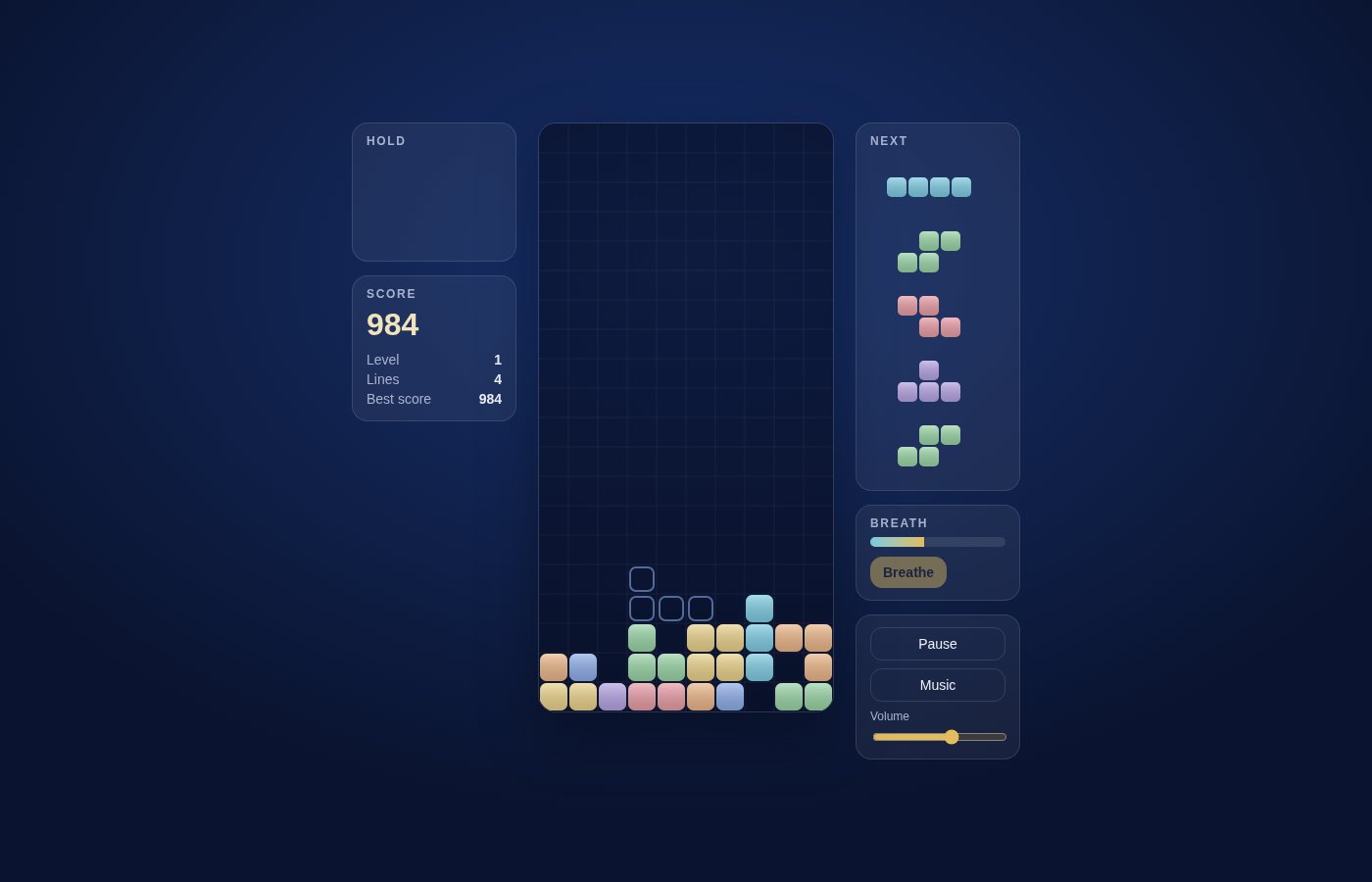

WyzeBloc is a falling-blocks puzzle made to relax rather than to stress. Seven shapes drop into a ten-column well; you slide, turn and place them to complete lines. The pace starts slow on purpose, the colours are soft, and a gentle generated soundtrack plays along with your moves.
Its signature is the Breath: clear lines to fill a gauge, and when it is full you can freeze the fall for eight seconds and place your pieces at your own rhythm. It is a single-player game that runs entirely on your Mac, with no account, no ads and nothing to buy.
What you get
- A slow, relaxed pace — The first level drops a row every second, and the speed rises only gently as you level up (every ten lines), with a floor so it never becomes frantic.
- The Breath — Clearing lines charges a gauge. When it is full, press B to freeze the fall for eight seconds and place pieces without any pressure.
- Seven pieces, fair order — The pieces come in shuffled bags of seven, so you never wait long for the shape you need. A preview shows the next five.
- Hold a piece — Keep a piece in reserve and swap it in when it suits you, once per piece placed.
- Ghost piece — A faint outline shows where the piece will land, so you can place it precisely.
- Forgiving controls — Rotate either way, and if a turn is blocked by a wall or blocks the piece nudges itself aside to make it fit. Moving a landed piece gives you a little more time before it locks, up to a limit.
- Soft drop and hard drop — Press down to lower a piece gently, or Space to drop it straight into place.
- Scoring that rewards chains — More lines at once score more, consecutive clears add a chain bonus, and clearing the whole board earns a large bonus.
- Music that plays with you — The soundtrack is generated live from a gentle scale, and each action plays a note in tune with the current chord. Turn the music off or adjust the volume at any time.
- Best score saved — Your best score is remembered on your Mac. Pause at any moment, and play in English or French.
Perfect for
- Anyone who wants a few quiet minutes of puzzle without a countdown
- Players put off by fast, high-pressure block games
- People who like a calm game with soft music at the end of the day
- Fans of the classic falling-blocks format who want it offline and ad-free
Frequently asked questions
What is WyzeBloc?
WyzeBloc is a single-player falling-blocks puzzle game for macOS, designed to be calm: slow speed, soft colours, gentle music and a Breath feature that pauses the fall.
Is WyzeBloc really free?
Yes. WyzeBloc is free for a limited time. Download it during that period and it is yours to keep, with no account, no ads and no in-app purchases.
Which keys do I use?
Left and right arrows move, down lowers the piece gently, Z or Up turns it, X turns it the other way, Space drops it straight down, C holds it, B uses the Breath, P pauses and M toggles the music. The in-game help lists them.
What is the Breath?
A gauge that fills as you clear lines. When it is full, the Breath freezes the fall for eight seconds so you can place pieces without pressure. It starts charging again afterwards.
Does it get harder?
Gradually. The level rises every ten lines and the fall speeds up, but it is capped, so the game stays slower than most block games.
Is it a copy of another game?
It uses the classic idea of seven four-block shapes completing lines, which is a familiar format. The rules, controls, scoring, Breath feature, look and music are WyzeBloc's own.
Is there online play, a leaderboard or multiplayer?
No. WyzeBloc is a single-player game that works offline. Your best score is saved on your Mac only.
Can I play with a game controller or the mouse?
No. WyzeBloc is played with the keyboard.
Which Macs are supported?
This build is for Macs with Apple silicon (M1 and later). Intel Macs are not supported.
macOS says the app cannot be opened. What do I do?
The app is not yet notarised by Apple, so macOS may block the first launch. Open System Settings > Privacy & Security, scroll to the message about the app and click Open Anyway. You only need to do this once.
More from Labwyze Apps

WyzePDFFree
The PDF editor for Mac that does it all: annotate, fix text, fill, sign and protect. Fully offline.

WyzeChessFree
Cinematic 3D chess: sculpted armies march, fight and fall on every capture. Play the computer or a friend.
WyzeTasksFree
Kanban boards for your Mac that work offline. Plan, drag, finish. No account, no cloud.
FrameDeckFree
Manage the art on all your Samsung The Frame TVs from your Mac. Upload, browse free museum art and rotate in a few clicks.

WyzePlanFree
Plan projects the way they really work: say what waits for what, and every date calculates itself.
WyzeSnapFree
Capture any part of your screen, mark it up and share it in seconds. Everything stays on your Mac.
WyzeScribeFree
Record your calls and meetings, both sides, and get an editable transcript made on your own Mac. No bot, no upload.

WyzeSketchFree
A hand-drawn whiteboard for diagrams and ideas. Sketch, save as a file, export to PNG, SVG or PDF. All on your Mac.

WyzeMotionFree
Record your screen and let the zooms write themselves. The camera follows your cursor, so your tutorials and demos look polished with no editing.

WyzePhotoFree
Edit photos with layers, masks and adjustments you can change at any time. Opens PSD and camera RAW files. Everything stays on your Mac.

WyzeClearFree
Remove the background from any photo in seconds. The AI runs on your Mac, so your pictures are never uploaded.
WyzeSolidFree
Open, measure and edit 3D CAD files on your Mac. STEP, IGES, BREP and STL, with nothing sent online.