
WyzePhoto
Edit photos with layers, masks and adjustments you can change at any time. Opens PSD and camera RAW files. Everything stays on your Mac.
FREE No account, no subscription. This app is completely free.
Updated October 2026 · v1.0.0
Your download starts right away. Mac with Apple silicon · 118 MB
Demo & screenshots
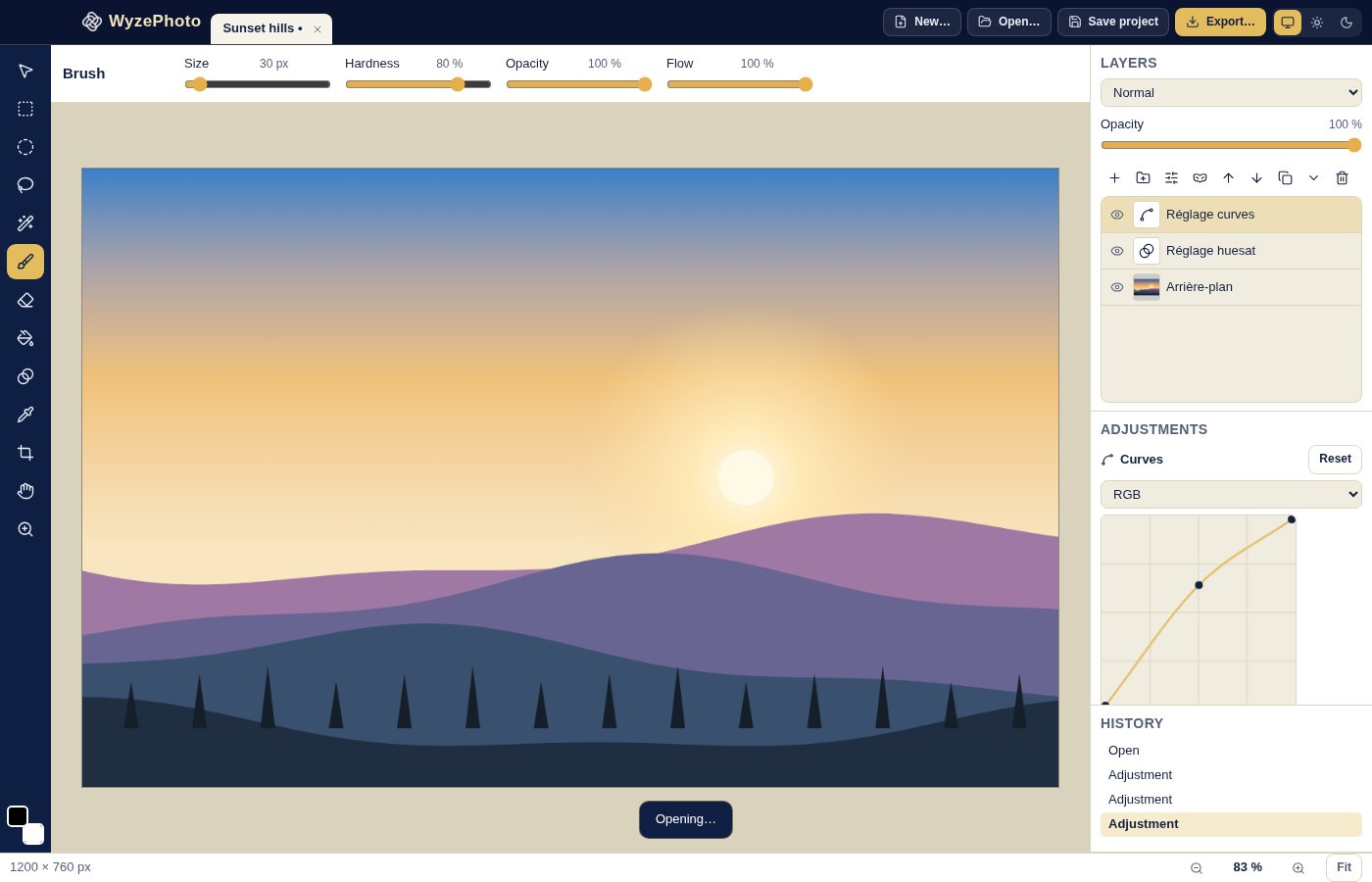
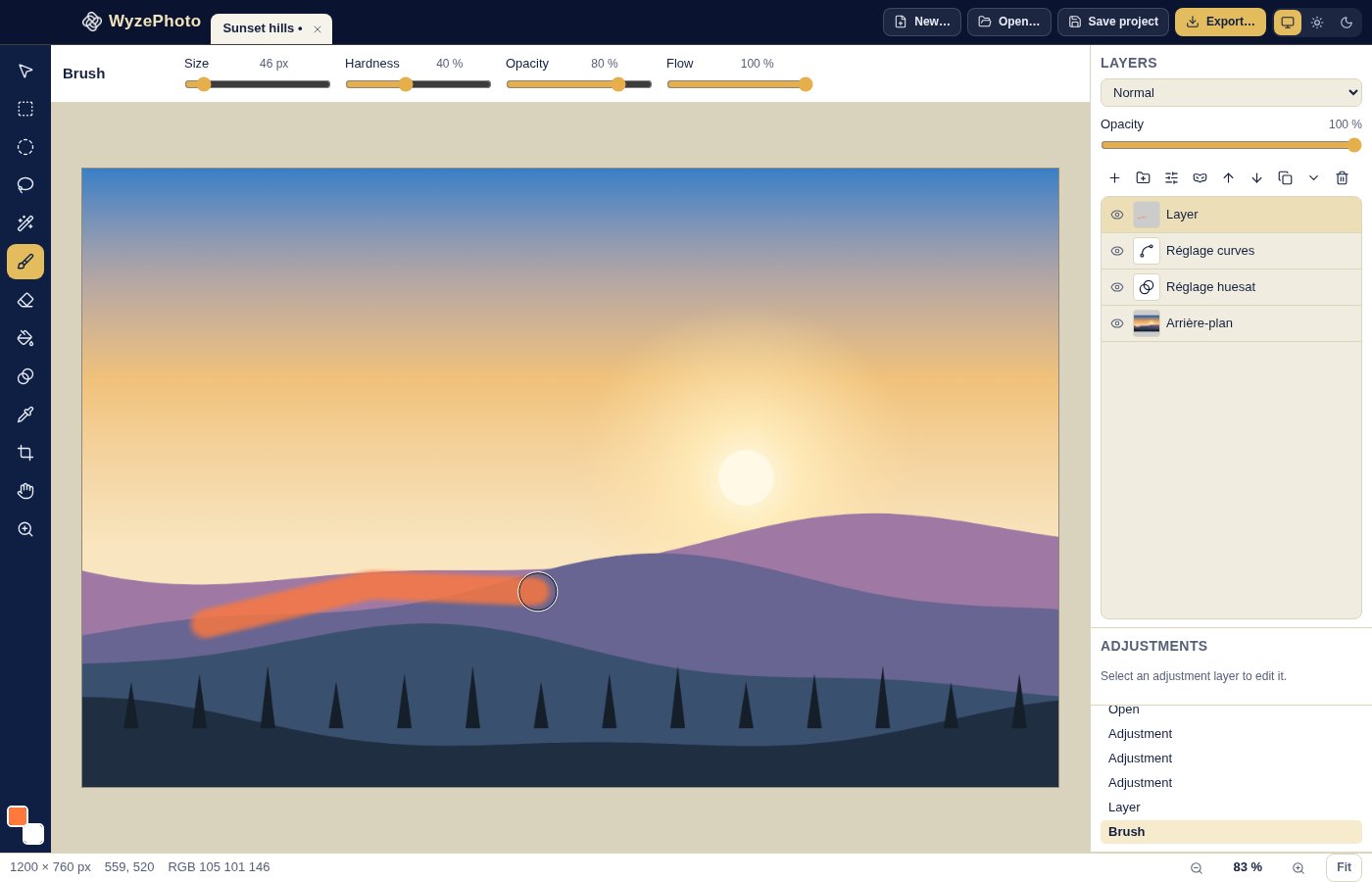
WyzePhoto is an image editor built around layers. Open a photo, a PSD file or a camera RAW file, and every change you make stays on its own layer that you can reorder, hide, fade or undo. Adjust the light and colour with non-destructive adjustment layers, hide or reveal parts of a layer with masks, and paint, select, crop and filter with the tools you would expect.
It runs entirely on your Mac: no account, no cloud, nothing uploaded. The screenshots show an illustration generated for this page, not a real photograph. WyzePhoto is a focused editor, not a replacement for a full professional suite, and the limits are listed below.
What you get
- Real layers — Stack as many layers as you need: add, duplicate, delete, rename, reorder, group, merge down, merge the visible ones or flatten the image. Each layer has its own opacity and visibility.
- 17 blend modes — Combine layers with Multiply, Screen, Overlay, Darken, Lighten, Color Dodge, Linear Dodge, Color Burn, Linear Burn, Hard Light, Soft Light, Difference, Exclusion, Hue, Saturation, Color and Luminosity, on top of Normal.
- Adjustment layers you can change later — Brightness/Contrast, Levels, Curves, Hue/Saturation, Vibrance, Exposure, Color Balance, Black & White, Threshold, Posterize and Invert. They sit above your photo without touching its pixels, so you can reopen and refine them at any time.
- Curves with a real curve editor — Click to add a point, drag to move it and double-click to remove it, for the whole image or a single colour channel.
- Layer masks — Hide or reveal parts of a layer without erasing anything. Create a mask from a selection, invert it, switch it on and off, apply it or delete it, and use clipping masks to limit a layer to the one below.
- Selections — Rectangle, ellipse, lasso and magic wand, with add, subtract and intersect modes. Invert, feather, grow or shrink a selection.
- Paint and fill tools — Brush and eraser with size, hardness, opacity and flow, plus a paint bucket, a gradient tool and a colour picker.
- Crop, transform and resize — Crop with free or fixed proportions (1:1, 4:3, 3:2, 16:9), rotate by 90° or 180°, flip, transform a layer by scale and rotation, and resize the image.
- Filters — Gaussian blur, sharpen, noise and pixelate, with a live preview before you apply them.
- Opens PSD, RAW and more — Open PNG, JPEG, WebP, GIF, BMP, AVIF, TIFF and PSD files, and camera RAW files from the main makers (CR2, CR3, NEF, ARW, DNG, ORF, RW2, RAF and others). Layers, masks, blend modes and many adjustments in a PSD come through.
- Export where you need — Export PNG, JPEG, WebP or TIFF, or keep your layers in a PSD file or in WyzePhoto's own project format. A history panel lets you step back through your edits, with rulers, guides, a grid and snapping to help you place things.
Perfect for
- Photographers who want to correct light and colour without destroying the original
- Designers and creators who need layers and masks without a heavy suite
- Anyone who receives PSD or RAW files and wants to open and adjust them on a Mac
- People who want an image editor that works offline and keeps their files private
Frequently asked questions
What is WyzePhoto?
WyzePhoto is a macOS image editor with layers, masks, adjustment layers, selections, painting tools and filters. It opens common image formats, PSD files and camera RAW files.
Is WyzePhoto really free?
Yes. WyzePhoto is free for a limited time. Download it during that period and it is yours to keep, with no account and no subscription.
Is it a replacement for Photoshop?
No. It covers the core of layered editing, but it is a focused app. It has no text tool, no shape or pen tools, no clone or healing brushes, and no smart objects. If your work depends on those, you need a larger editor.
What happens when I open a PSD?
Layers, groups, opacity, visibility, masks, clipping, supported blend modes and many adjustment layers come through. Some things are simplified: text layers are turned into regular pixels so they can no longer be edited as text, and adjustments or blend modes the app does not support are skipped. The app tells you what it ignored.
How are RAW files handled?
A RAW file is developed once with the camera's own settings and opened as a normal image. It is not a full RAW workflow with a non-destructive development step, but you can then adjust it with Exposure, Curves and the other adjustment layers.
Are my edits destructive?
Adjustment layers and masks are not: they never change the pixels below them, and you can edit or delete them later. Painting, filters and erasing do change the pixels of the layer you apply them to, though you can step back through the history.
Is there a size limit?
Yes. An image can be up to 16,384 pixels on a side and 100 megapixels in total. Larger files are refused with a message.
Where are my files kept?
On your Mac, where you save them. To keep all your layers, save as a PSD or as a WyzePhoto project. Exporting to PNG, JPEG, WebP or TIFF flattens the image.
Which Macs are supported?
This build is for Macs with Apple silicon (M1 and later). Intel Macs are not supported.
macOS says the app cannot be opened. What do I do?
The app is not yet notarised by Apple, so macOS may block the first launch. Open System Settings > Privacy & Security, scroll to the message about the app and click Open Anyway. You only need to do this once.
More from Labwyze Apps
WyzePDFFree
The PDF editor for Mac that does it all: annotate, fix text, fill, sign and protect. Fully offline.
WyzeChessFree
Cinematic 3D chess: sculpted armies march, fight and fall on every capture. Play the computer or a friend.
WyzeTasksFree
Kanban boards for your Mac that work offline. Plan, drag, finish. No account, no cloud.
FrameDeckFree
Manage the art on all your Samsung The Frame TVs from your Mac. Upload, browse free museum art and rotate in a few clicks.
WyzePlanFree
Plan projects the way they really work: say what waits for what, and every date calculates itself.
WyzeSnapFree
Capture any part of your screen, mark it up and share it in seconds. Everything stays on your Mac.
WyzeScribeFree
Record your calls and meetings, both sides, and get an editable transcript made on your own Mac. No bot, no upload.
WyzeSketchFree
A hand-drawn whiteboard for diagrams and ideas. Sketch, save as a file, export to PNG, SVG or PDF. All on your Mac.
WyzeMotionFree
Record your screen and let the zooms write themselves. The camera follows your cursor, so your tutorials and demos look polished with no editing.
WyzeBlocFree
A calm falling-blocks game for one player. Slow pace, soft colours and music. Breathe, place, enjoy.
WyzeClearFree
Remove the background from any photo in seconds. The AI runs on your Mac, so your pictures are never uploaded.
WyzeSolidFree
Open, measure and edit 3D CAD files on your Mac. STEP, IGES, BREP and STL, with nothing sent online.