

WyzeSnap
Capture any part of your screen, mark it up and share it in seconds. Everything stays on your Mac.
FREE No account, no subscription. This app is completely free.
Updated October 2026 · v1.0.0
Your download starts right away. Mac with Apple silicon · 112 MB
Demo & screenshots
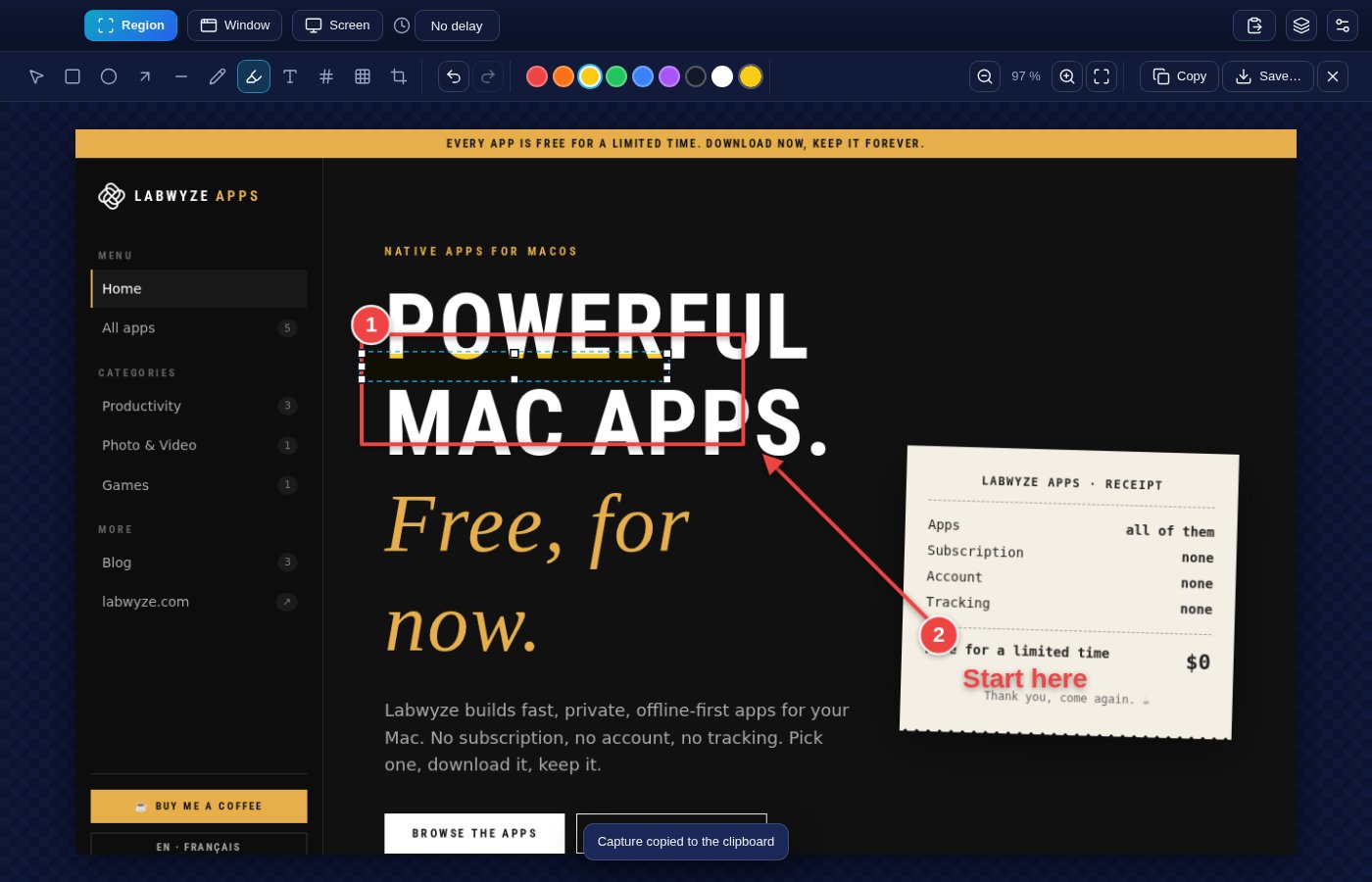
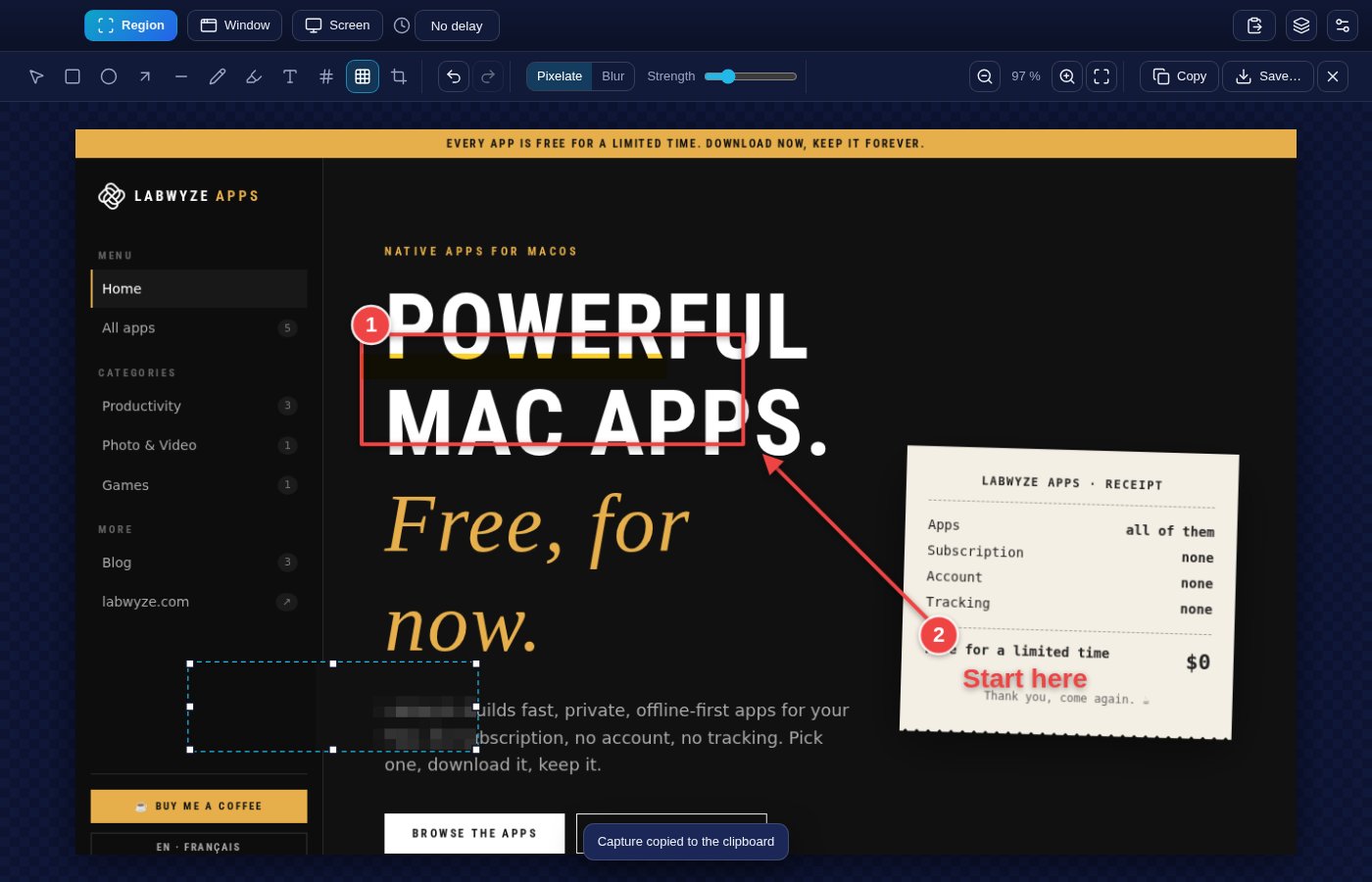
WyzeSnap is a fast screenshot tool that lives in your menu bar. Press a shortcut, drag over what you want, and the capture is on your clipboard and ready to mark up: draw a box, point an arrow, number the steps, add a note or blur out what should stay private.
Your captures are stored on your own Mac. There is no account and no upload, and every annotation stays editable, so you can come back to a capture later and change it.
What you get
- Three ways to capture — Capture a region, a whole screen or a single window. Windows are chosen from a list, so you do not have to click and hope.
- Global keyboard shortcuts — Capture from any app with ⌥⇧4 for a region, ⌥⇧3 for the screen and ⌥⇧5 for a window. Change them to whatever suits you; WyzeSnap warns you if a shortcut is reserved by macOS or taken by another app.
- In your menu bar — A menu bar icon gives you every capture mode, the library and the settings without opening a window.
- A delay when you need it — Add a timer before the capture so you can open a menu or hover over something first.
- Copied automatically — Each capture goes straight to the clipboard, ready to paste into an email or a chat. You can turn this off.
- A full set of annotation tools — Rectangle, ellipse, arrow, line, freehand pen, highlighter, text and numbered steps. Pick the colour, thickness, fill and shadow, and hold Shift for perfect squares, circles and 45° lines.
- Blur or pixelate what is private — Hide a password, a face or an address with blur or pixelation, with an adjustable strength. The original image is never altered.
- Crop, zoom and fix — Crop after the fact, zoom in for precision, and undo or redo any step.
- A library of recent captures — Every capture is saved with its annotations, newest first, with thumbnails. Reopen one and every box, arrow and note is still editable.
- Paste, drop and save — Paste an image from the clipboard or drag one in, then save as PNG or JPEG, or copy it back to the clipboard.
- Light on your Mac — Native Retina capture at full resolution, no account and nothing sent anywhere. Available in English and French.
Perfect for
- Support teams and trainers who explain steps with numbered, annotated screenshots
- Designers and developers who give precise feedback on a screen
- Anyone who writes documentation, tutorials or bug reports
- People who want to share a screen without exposing private details
Frequently asked questions
What is WyzeSnap?
WyzeSnap is a screenshot and annotation app for macOS. It captures a region, a window or the screen, lets you mark the image up, and keeps a library of your recent captures.
Is WyzeSnap really free?
Yes. WyzeSnap is free for a limited time. Download it during that period and it is yours to keep, with no account and no subscription.
macOS asks for Screen Recording permission. Why?
macOS requires it for any app that captures the screen. Open System Settings > Privacy & Security > Screen Recording, switch WyzeSnap on, then relaunch the app. WyzeSnap only captures when you ask it to, and nothing is sent anywhere.
Where are my captures stored?
On your Mac only, in the app's library. The original image is kept untouched and the annotations are saved separately, which is why you can edit them later. The library keeps your most recent captures.
Can I change the keyboard shortcuts?
Yes, in Settings. The defaults are ⌥⇧4 for a region, ⌥⇧3 for the screen and ⌥⇧5 for a window. WyzeSnap refuses combinations reserved by macOS or already used, and tells you when another app has taken one.
Does it record video?
No. WyzeSnap handles still screenshots only.
Which Macs are supported?
This build is for Macs with Apple silicon (M1 and later). Intel Macs are not supported.
macOS says the app cannot be opened. What do I do?
The app is not yet notarised by Apple, so macOS may block the first launch. Open System Settings > Privacy & Security, scroll to the message about the app and click Open Anyway. You only need to do this once.
More from Labwyze Apps

WyzePDFFree
The PDF editor for Mac that does it all: annotate, fix text, fill, sign and protect. Fully offline.

WyzeChessFree
Cinematic 3D chess: sculpted armies march, fight and fall on every capture. Play the computer or a friend.
WyzeTasksFree
Kanban boards for your Mac that work offline. Plan, drag, finish. No account, no cloud.
FrameDeckFree
Manage the art on all your Samsung The Frame TVs from your Mac. Upload, browse free museum art and rotate in a few clicks.

WyzePlanFree
Plan projects the way they really work: say what waits for what, and every date calculates itself.
WyzeScribeFree
Record your calls and meetings, both sides, and get an editable transcript made on your own Mac. No bot, no upload.