

WyzeChess
Cinematic 3D chess: sculpted armies march, fight and fall on every capture. Play the computer or a friend.
FREE No account, no subscription. This app is completely free.
Updated October 2026 · v0.1.0
Your download starts right away. Mac with Apple silicon · 188 MB
Demo & screenshots
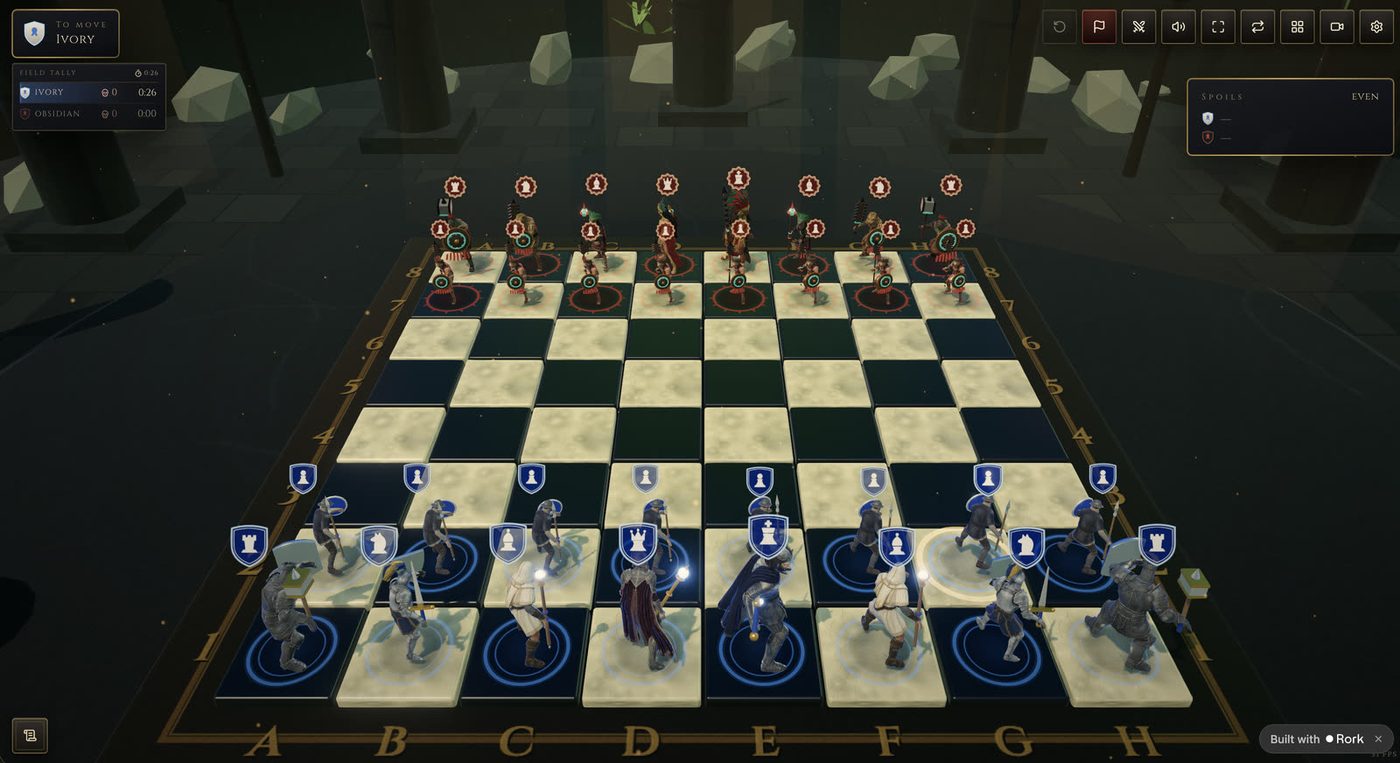
WyzeChess turns a game of chess into a battle you can watch. Instead of plastic pieces sliding across a grid, rival armies of sculpted, animated characters face each other on a marble-and-basalt board. When you take a piece, your figure walks the distance, strikes, and claims the square.
It runs entirely on your Mac. No account, no sign-up, no internet connection needed once it is installed, and nothing you play is sent anywhere.
What you get
- Complete chess rules — Castling, en passant, promotion, check, checkmate, stalemate, threefold repetition, the fifty-move rule and insufficient material.
- A real opponent at three strengths — Squire plays fast and loose, Knight thinks a few moves ahead, and Warlord searches deeply and shows no mercy. The engine runs off the main thread, so the board never stutters while it thinks.
- Characters that fight, not slide — Every piece is a rigged 3D figure that turns, walks at the pace of its rank and strikes with a blow that scales with what it is. Knights leap, casters kill at range.
- Three armies to choose from — Ivory Kingdom, Sun Empire or the Grande Armée, each with its own sculpts, weapons and death cries. Pick a different army for each side in Settings.
- Seven battlegrounds — Each one relights the whole hall, from sky and haze to stone and fire, and brings its own music.
- Always clear who is who — A painted band on each tile, a rim light and a different shape for each side keep the armies readable, even for colour-blind players.
- Three ways to play — Player vs Computer, two players on one screen, or AI vs AI to just watch. Optional clocks of 5, 10 or 15 minutes.
- A flat view when you need to think — One key lifts the camera straight overhead and flattens every figure into a clean counter, so nothing hides a square.
- Everything a chess player expects — Undo, resign, flip the board, a move record you can copy as PGN, and a captured-pieces tray with the material score.
- Graphics that adapt — Presets from Low to Ultra are chosen automatically, and the game steps down by itself if your frame rate drops.
Perfect for
- Chess players who want a real game that is also worth looking at
- Beginners who learn faster when they can see what a capture costs
- Two people sharing one Mac at a kitchen table
- Anyone who wants something beautiful running on the screen
Credits
The game at the heart of WyzeChess is King’s Gambit – Medieval 3D Chess, an open-source project by its contributors (rork-medieval-3d-chess), used under the MIT licence. WyzeChess is the Mac desktop app built around it, with every model, sound and texture bundled into the download so the game keeps working with the network off.
Frequently asked questions
What is WyzeChess?
WyzeChess is a 3D chess game for macOS where animated armies fight every capture. You can play the computer, a friend on the same Mac, or watch two engines duel.
Is WyzeChess really free?
Yes. WyzeChess is free for a limited time. Download it during that period and it is yours to keep, with no account and no subscription.
Do I need an internet connection?
No. Everything is bundled in the app, so it keeps working with the network off. Nothing you play is sent anywhere.
Which Macs are supported?
This build is for Macs with Apple silicon (M1 and later). Intel Macs are not supported. A Mac with a decent graphics chip is recommended for the Ultra preset.
Why is the download so large?
All the 3D models, voices and music are included so the game loads from your own disk.
macOS says the app cannot be opened. What do I do?
The app is not yet notarised by Apple, so macOS may block the first launch. Open System Settings > Privacy & Security, scroll to the message about the app and click Open Anyway. You only need to do this once.
More from Labwyze Apps

WyzePDFFree
The PDF editor for Mac that does it all: annotate, fix text, fill, sign and protect. Fully offline.
WyzeTasksFree
Kanban boards for your Mac that work offline. Plan, drag, finish. No account, no cloud.

FrameDeckFree
Manage the art on all your Samsung The Frame TVs from your Mac. Upload, browse free museum art and rotate in a few clicks.

WyzePlanFree
Plan projects the way they really work: say what waits for what, and every date calculates itself.

WyzeSnapFree
Capture any part of your screen, mark it up and share it in seconds. Everything stays on your Mac.
WyzeScribeFree
Record your calls and meetings, both sides, and get an editable transcript made on your own Mac. No bot, no upload.