Tasks on the web and on Mac · Built for ADHD minds
Do the next thing.
Not everything.
WyzeFocus is a task manager designed around how ADHD brains actually work. See a day that fits the hours you have, let it pick what fits a session, and get unstuck with one tiny first step.
Real screen recordings of the app on a Mac, with sample data.
01Today
A day you can see.
Plan tasks with an optional time and an estimated length. A load bar compares what you planned with the hours you really have, and turns red when the day overflows. Quick add understands “Call Marie tomorrow 30m #Personal”.
02Spotlight
Too many choices? Pick a length.
Say how long you have. Spotlight proposes the tasks that fit, the most urgent first. Swap one, or ask for another selection.
03Super focus
One task. Nothing else.
Super focus walks you through your selection one task at a time, full screen, with nothing else in view. Tick it off, and the next one is there.
04I’m stuck
Stuck? Start smaller.
Tell it what is blocking you: too big, unclear, boring, scary, or no time. A few short questions end with a tiny first step you can start right now.
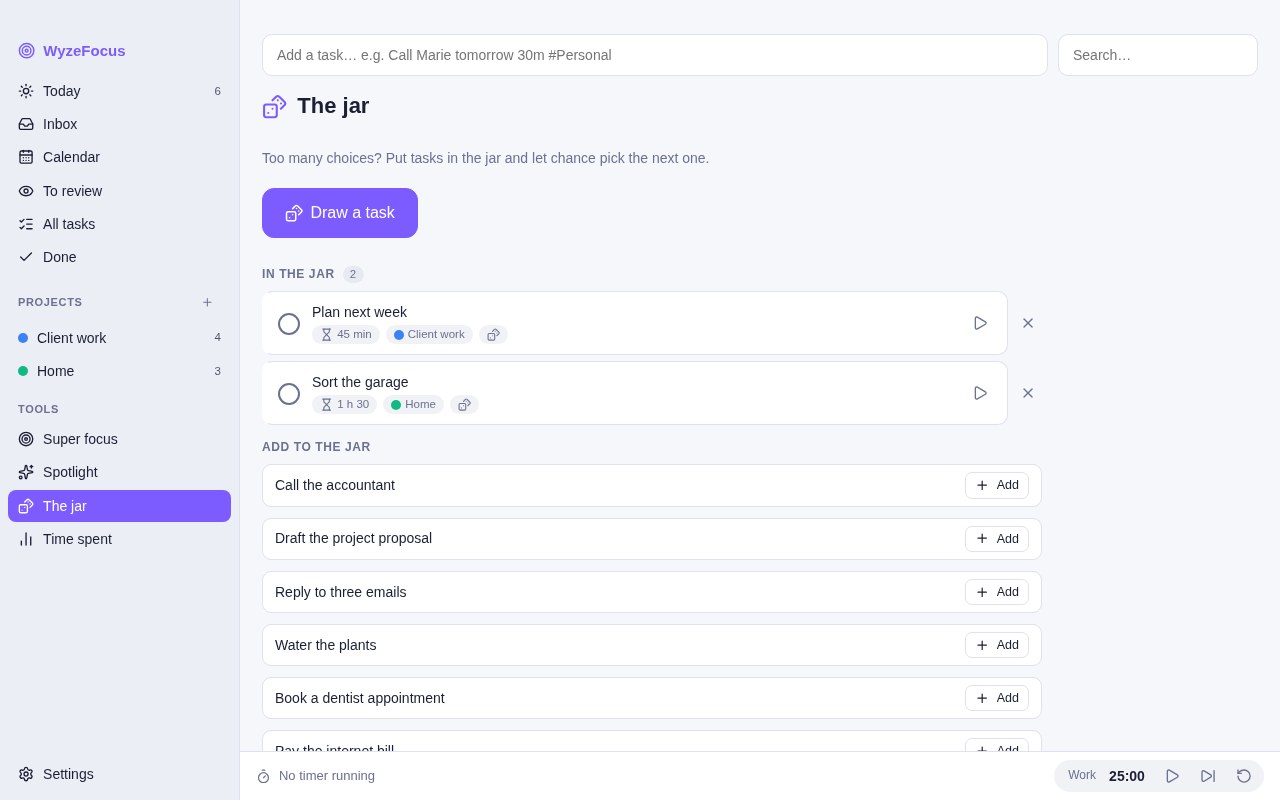
05The jar
Can’t decide? Draw from the jar.
Put a few tasks in the jar and let chance pick the next one. Sometimes the best choice is the one you do not have to make.
Tutorial
Learn WyzeFocus in two minutes.
A guided tour of the key features, with narration and subtitles. Recorded in the real app, with sample data.
The film
Forty seconds, one idea at a time.
A short tour, made for your phone. Turn the sound on.
Kind by design.
No guilt
No streaks, no points, no levels, no badges. A missed day is just a day.
As simple as you want
Turn off any feature you do not use: calendar, Spotlight, jar, Pomodoro, columns and more.
Yours, in your iCloud
Your tasks live in one file on your Mac and sync through your own iCloud. No account with us, and no tracking.
Honest by design
A productivity tool built with ADHD in mind. It does not diagnose or treat anything.
And everything else
Quick capture
A global shortcut opens a small window from any app. Type, press Return, done.
Pomodoro
Work, break and long break lengths you set yourself.
Time tracking
A timer per task and a report by project for today, 7 or 30 days.
List, grid or columns
To do, Doing and Done columns, an inbox, a calendar and a review list.
Projects and repeats
Nested projects, sub-tasks, labels, due dates and flexible repeats.
From WyzeMind
Send lines or unchecked boxes of a note to WyzeFocus, with a link back.
Backup and CSV
Export and import a backup, or bring tasks in from a CSV file.
Light, dark, two languages
Light, dark or automatic, your accent colour, in English and French.
Web version · Available now
Plan on your Mac. Tick it off on your phone.
The web version is the same app, on iPhone, iPad or any computer, with nothing to install. Sign in with Apple once, and your tasks, projects and preferences sync with your Mac through your own iCloud, never through our servers. Add it to your Home Screen and it opens full screen.
On iPhone, in Safari: Share > Add to Home Screen. Native iPhone and iPad apps are coming soon.
Questions
What is WyzeFocus?
WyzeFocus is a task manager for macOS designed for ADHD minds. It combines a day planner, a Spotlight that picks tasks to fit a session, a Pomodoro timer, a jar for random choice and an “I’m stuck” helper. It syncs through your iCloud, and a web version runs on iPhone and iPad. It is free for a limited time.
Is WyzeFocus a medical tool?
No. It is a productivity app. It is built with ADHD in mind, but it does not diagnose, treat or replace professional support.
Where is my data stored?
In a single file named wyzefocus.json in the app’s data folder on your Mac. If you turn on sync, a copy also goes to your own iCloud private database, which we cannot read. There is no account with us. Besides iCloud, the Mac app only reads a small public file every 6 hours to see whether a newer version exists, without sending any data.
How does Spotlight choose tasks?
You pick a session length. WyzeFocus ranks open tasks (overdue first, then planned for today, then due within 7 days, then unplanned) and adds them until the estimated time fills the session. A task with no estimate counts as 30 minutes.
Does it have gamification?
No. There are no streaks, points, levels or badges.
Can I turn off the features I do not use?
Yes. The settings let you switch off the calendar, review dates, Super focus, Spotlight, the jar, the Pomodoro timer, time tracking, the “I’m stuck” helper and the columns view.
Can I import my tasks from another app?
Through a CSV file with a title column. The columns project, date, due date, duration, note and done are also recognised. There is no direct import from other task apps.
Does it sync between my devices?
Yes, through your own iCloud. On your Mac, open Settings > iCloud sync and click Sign in with Apple. Then open wyzefocus.labwyze.com in Safari on your iPhone or iPad and sign in with the same Apple account. Tasks sync a few seconds after a change, when you come back to the app, and every 5 minutes. Theme, colour and language stay specific to each device.
Which Macs does it run on?
Macs with Apple silicon (M1 and later). The app is not available for Intel Macs, but the web version runs in a recent browser.
How do I open the app the first time?
WyzeFocus is signed with a Developer ID and notarised by Apple. The first time, macOS asks you to confirm that you want to open an app downloaded from the internet: click Open. If you still see a warning, open System Settings > Privacy & Security and click Open Anyway.
Start with one small thing.
WyzeFocus is a productivity app. It does not diagnose, treat or replace professional support.